
SSL proxying
A new session decrypts every HTTPS host. Turn SSL proxying off for a host and zhttp passes its connections through untouched: the app’s TLS goes straight to the server, and zhttp only sees the host name and how many bytes went each way.
Turn it off for hosts that:
- pin their certificate and refuse zhttp’s (they show Client rejected the proxy);
- you don’t want decrypted, such as a bank.
One host at a time
Section titled “One host at a time”Any of these:
- click the lock beside the host in Structure;
- right-click one or more hosts in Structure › Disable SSL proxying for api.example.com (or for 3 hosts);
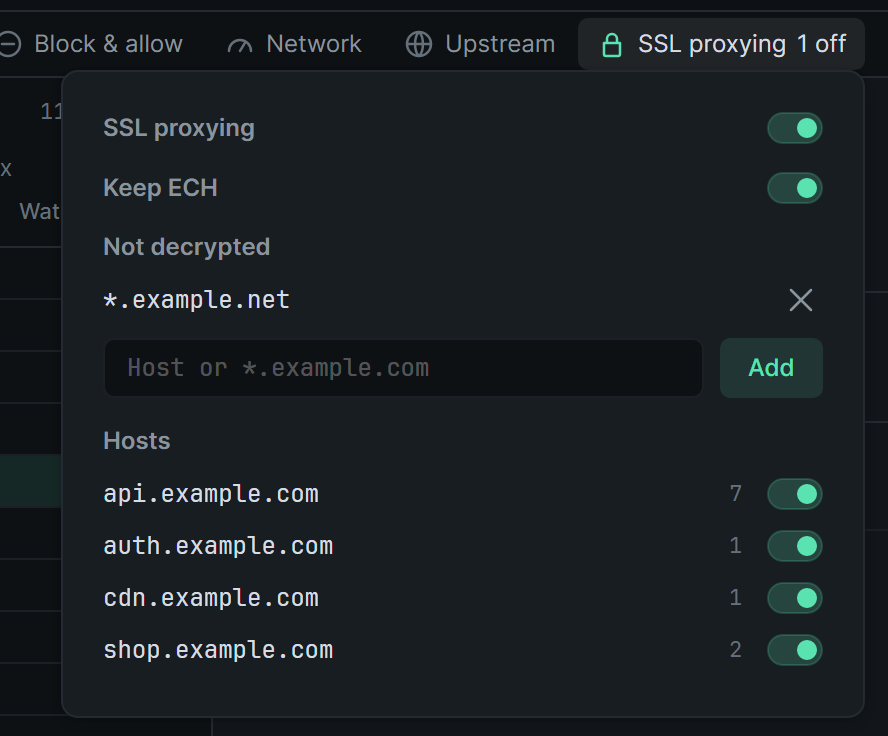
- open SSL proxying at the right end of the session tabs, and use the host’s Decrypt switch under Hosts.
Do the same to decrypt it again. The menu item then reads Enable SSL proxying for …
A wildcard
Section titled “A wildcard”In the SSL proxying panel, type a pattern under Not decrypted and click Add (or press Enter).
| Pattern | Matches |
|---|---|
api.example.com |
That host only |
*.example.com |
example.com and every host under it |
*bank* |
Any host with bank in its name |
A pattern can’t contain spaces, / or :; it’s a host name, not a URL. A host covered by a pattern has its switch greyed out. Remove the pattern with its × to decrypt the host again.
Every host at once
Section titled “Every host at once”In the SSL proxying panel, turn off the SSL proxying switch at the top. zhttp then passes every HTTPS connection through untouched, and the host switches are greyed out. Your Not decrypted list is kept, and applies again when you turn the switch back on.
Keep ECH
Section titled “Keep ECH”Chrome, for example, adds a part called encrypted_client_hello (ECH) to the first message of every secure connection. With Keep ECH on, as it is in a new session, zhttp sends that part on to the server, so the server sees the app’s own fingerprint.
Turn Keep ECH off and zhttp leaves that part out. The server then sees a fingerprint that differs from the app’s: the request’s TLS tab shows Differs from the client’s, with the line encrypted_client_hello left out, as Keep ECH is off. Apps that don’t send ECH aren’t affected.
What you’ll see
Section titled “What you’ll see”- The host’s lock in Structure is crossed out, and the host reads fainter.
- Its connections are listed as faint rows with no request inside. Overview for one says
No. This host is passed through untouched.The filter button above the list can hide them. - The SSL proxying button in the session row counts the hosts and patterns that are off, for example
2 off. It readsOffwhile SSL proxying is off for every host.
A change applies to connections made from then on. Connections already open stay as they were.
Each session keeps its own list and switches, saved between restarts. Recordings have no SSL proxying settings.