
Scripting
A script runs JavaScript on each exchange it matches. onRequest runs before the request goes to the server, and onResponse runs before the response goes to the app. Each can change the method, the path and query, the headers, the cookies, the status and the body.
For what a script is given and the helpers it can call, see the script reference. For scripts to copy, see the recipes.
The Scripts window
Section titled “The Scripts window”Open it with any of:
- the
{ }button in the top bar; - Ctrl Shift J, or Open scripts in the command palette;
- right-click a request › Script…, which adds a script for that URL with any query string;
- right-click a host or folder in Structure › Script…
The window shows the scripts of the session chosen in the main window, and follows it when you switch tabs. Scripts are saved with the session.
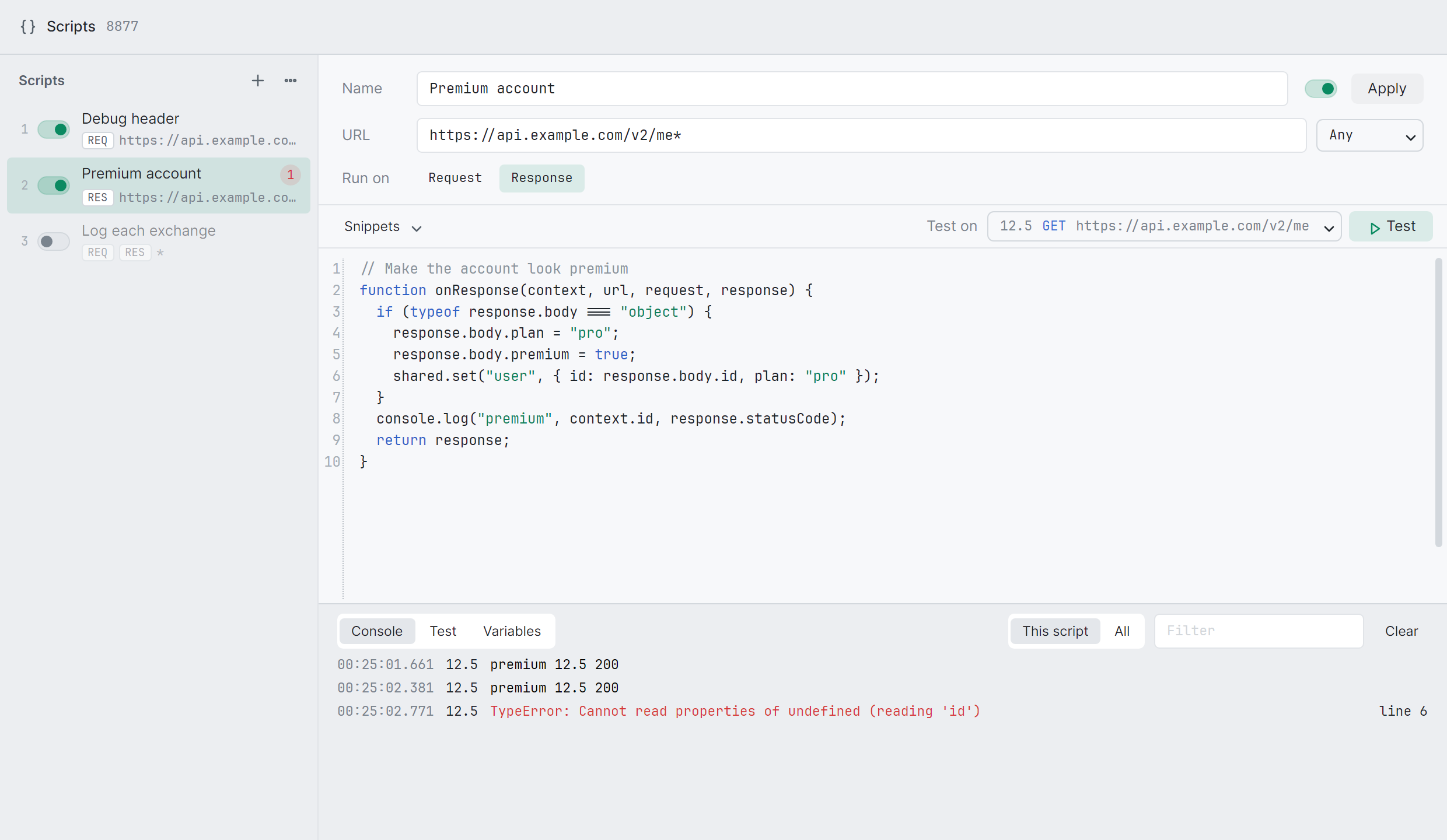
On the left is the list, in the order the scripts run. Each row shows:
- its number in the run order;
- a switch to turn it on or off;
- its name, and its URL under it;
- REQ and RES for whether it runs on requests, responses or both;
- a dot while it has changes not yet applied;
- a red count of the errors it has hit since it was last applied.
+ adds a script from a template. Drag a script up or down to change when it runs. Right-click one to Duplicate it, Save as .js…, move it, or Remove it. Undo under the list puts back a script you just removed.
On the right, Name, URL and Method say which requests the script runs on. URL and method work as they do for breakpoints. Run on picks Request, Response or both.
Writing a script
Section titled “Writing a script”Changes to a script don’t run until you Apply them (Ctrl S). Until then the last applied version keeps running on traffic, and Revert throws your changes away. Changes you haven’t applied stay in the editor when you switch scripts or close the window, but not when you quit zhttp.
While you type:
- the script is checked as it would load. A syntax error, or a missing
onRequestoronResponse, shows under the editor with its line underlined. Click it to go to that line. - the editor offers the names that match what you type: a script’s own, such as
sha256(data, encoding = "hex"), the language’s keywords and the names already in the script. After a.it offers what is there, such asrequest.›headers,cookies… Enter or Tab puts one in, and Ctrl Space offers them at the caret. - Snippets inserts common code where the caret is. A snippet goes on the caret’s line when that line is blank, or else on a new line after it, indented to match.
- Format (Shift Alt F) lays the script out as js-beautify does, two spaces an indent, keeping its comments. Ctrl Z takes it back.
- Ctrl F finds text in the script.
Run order
Section titled “Run order”Every script that matches a request runs, top to bottom. Each is given what the one before made of the request or the response. When a breakpoint matches too, the scripts run first and the breakpoint holds what they made.
Test (Ctrl Enter) runs the script as it is written, applied or not, on a captured request. Nothing is sent.
Test on picks the request. It lists the one selected in the main window first, then the latest requests the script’s URL and method match.
The Test tab shows the request, and the response when the script runs on responses. What was captured is on the left, what the script makes of it is on the right, and the changes are marked. A count beside Request and Response says how many lines changed.
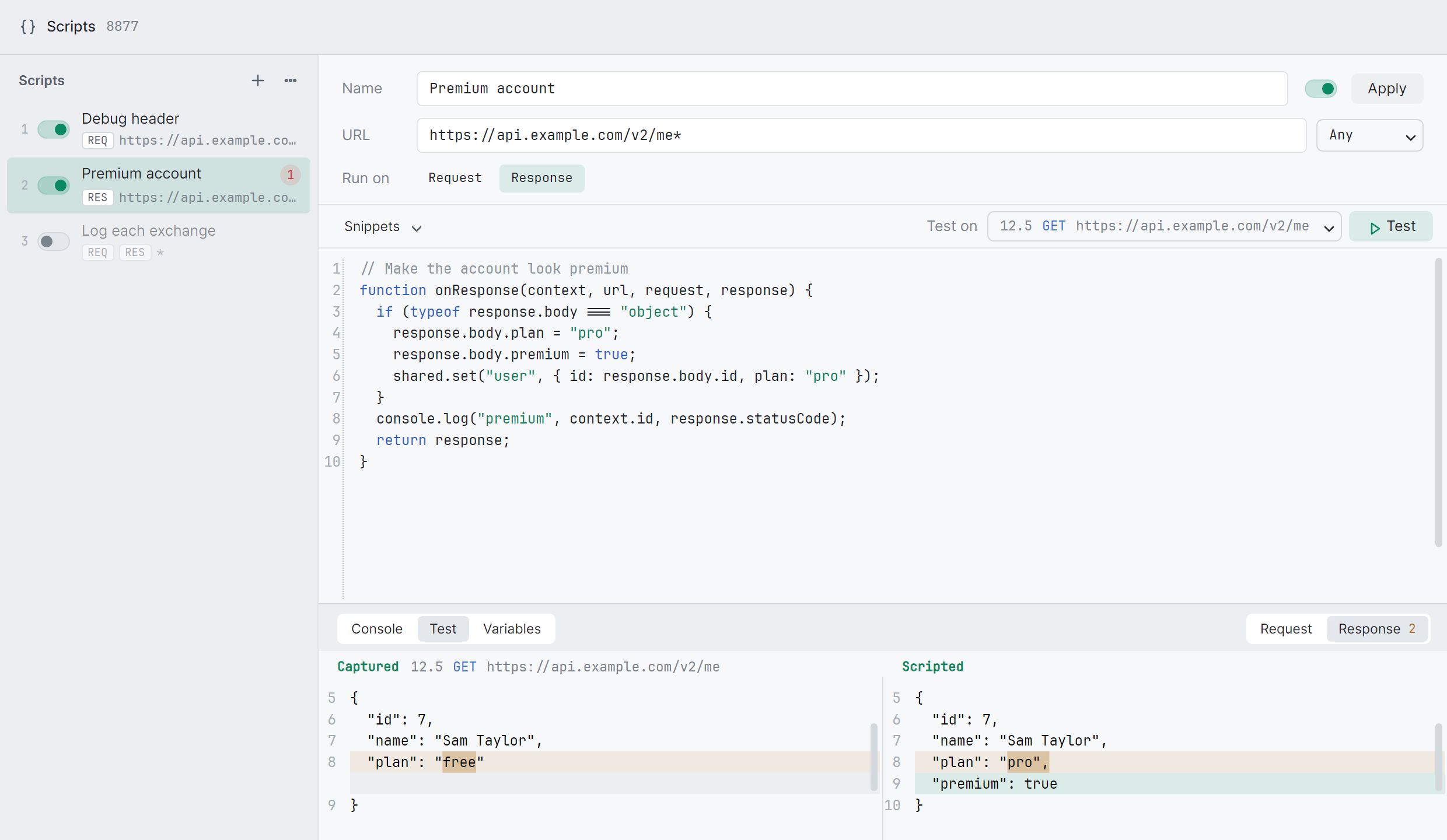
If the script fails, the error shows above, its line is underlined in the editor, and the right side says what zhttp would have done: Not sent for a request, Answered with a 502 for a response. What the script logs goes to the console, marked test.
A test uses a copy of the session’s variables: what it sets doesn’t reach them. It runs on the exchange as it was captured, so a request a script already changed gets changed again. The test needs the exchange’s bodies captured in full.
Console
Section titled “Console”The Console tab shows what the script logs with console.log, console.warn and console.error, and why it failed, one line each:
- when it ran;
- the request’s entry ID: click it to show that request in the main window;
- for an error, line N: click it to go to that line.
This script shows the selected script’s lines, All shows every script’s, with the script’s name. Filter keeps the lines that contain its text. Right-click › Copy all copies the lines shown.
Variables
Section titled “Variables”The Variables tab lists the variables the session’s scripts share through shared. Smart actions read and set the same ones. They change as scripts set them. Edit a name or a value there, Add one, or delete one with ×. A string stays a string, so type it without quotes. Any other value must be JSON: a value that isn’t gets a red outline and isn’t applied.
Variables last when you edit a script, and are saved with the session.
Save, import and export
Section titled “Save, import and export”Save as .js… writes one script to a file, with a header saying where it runs:
// ==zhttp==// @name Premium account// @url https://api.example.com/v2/me*// @method GET// @run response// @enabled true// ==/zhttp==function onResponse(context, url, request, response) { response.body.plan = "pro"; return response;}@method is left out for any method. @run is request, response or request, response.
⋯ › Export all… writes every script, in the order they run, and the session’s variables, to one .json file. ⋯ › Import… takes .js files and exported .json files, one or many. Imported scripts go after the ones there are, switched on or off as they were saved. Imported variables replace any of the same name. A .js file without a header is named after the file, gets no URL, and runs on whichever of onRequest and onResponse it defines.
What is saved, exported and duplicated is each script as it is written in the editor.
Templates
Section titled “Templates”| Blank | Both functions, returning what they’re given |
| Add a request header | Adds X-Debug: 1 |
| Change a query parameter | Sets page, removes cache |
| Edit a JSON response | Adds debug: true to a JSON body |
| Replace the response | Answers 200 with a JSON body of its own |
| Log each exchange | Logs the method, URL, status and content type |
When a script fails
Section titled “When a script fails”A run is stopped after 1 second of running. Time spent in sleep doesn’t count. If a script throws, times out, returns nothing or has a syntax error:
- the request is not sent, and its exchange ends;
- the response is replaced with a
502whose body startszhttp's script failed on this response:, followed by the error.
The scripts after it don’t run. The error goes to the console in red, with its line, and the script’s row counts it.
| Keys | In the Scripts window |
|---|---|
| Ctrl S | Apply the script |
| Ctrl Enter | Test it |
| Ctrl N | New script |
| Ctrl D | Duplicate the script |
| Alt ↑ ↓ | Move it up or down |
| Delete | Remove it, in the list |
| Ctrl Space | Offer what a script can use |
| Shift Alt F | Format the script |
| Ctrl Shift Z, Ctrl Y | Redo |
| Ctrl F | Find in the script |
| Esc | Close the window |
On a Mac, Cmd works as well as Ctrl with S, Enter, N and D, and redo is Cmd Shift Z.
Limits
Section titled “Limits”- A script can’t send a request to another server. Changing
scheme,hostorportis an error. - Event streams and WebSockets go on as they came.
- Scripts have no network or file access.
- AI agents see scripts among the rules (
zhttp_rules), and can add, change, test and reorder them. See AI agents.