
Block and allow lists
Each session has two lists:
- Blocked: zhttp refuses requests that match. Nothing reaches the server, and the app gets a
403 Forbidden. - Allowed: if this list has entries, zhttp captures only the hosts on it. Other traffic still works, but zhttp passes it through untouched and records nothing of it.
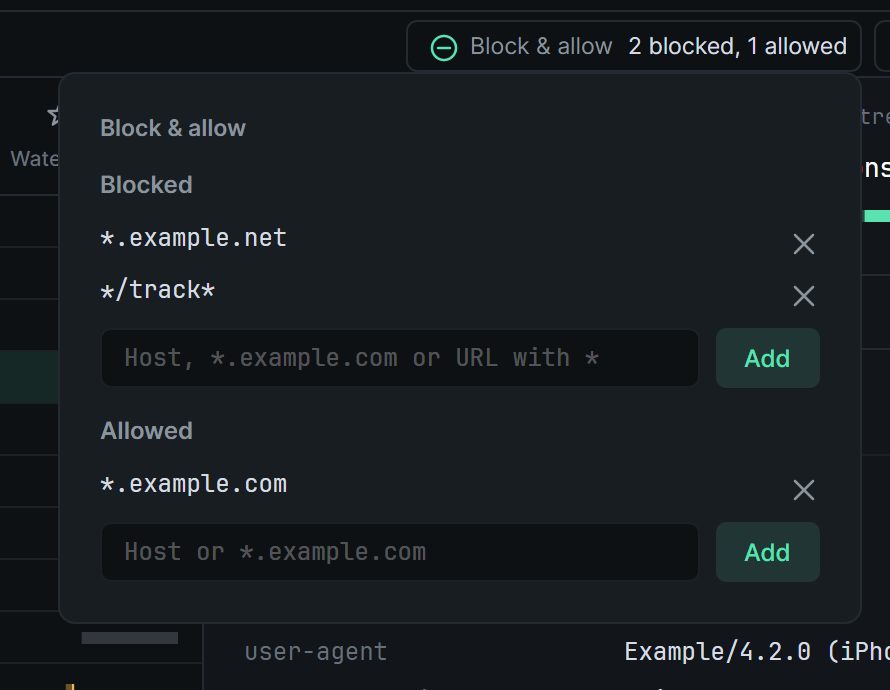
Block or allow a host
Section titled “Block or allow a host”Use either of these:
- Right-click one or more hosts in Structure, then choose Block api.example.com or Add api.example.com to allow list. With several hosts chosen, these read for 3 hosts.
- Open Block & allow at the right end of the session tabs. Type an entry under Blocked or Allowed, then click Add or press Enter.
To undo, use the same menu item, which now reads Unblock … or Remove … from allow list. Or click an entry’s × in the panel.
Patterns
Section titled “Patterns”A blocked entry without a / is a host, and one with a / is a URL pattern. Allowed entries are always hosts.
| Entry | Matches |
|---|---|
ads.example.com |
That host only |
*.example.net |
example.net and every host under it |
*/track* |
Any URL with /track in it |
https://cdn.example.com/ads/* |
Everything under that path |
* stands for any run of characters, and case doesn’t matter. A URL pattern is matched against the whole URL, so it must start with its scheme (https://) or with *. Host entries can’t contain spaces or :.
What a blocked request looks like
Section titled “What a blocked request looks like”- Blocked host: the app’s
CONNECTis refused with a403, so zhttp never opens a connection to the server. If the host only appears in the TLS hello’s server name, zhttp ends the handshake with anaccess_deniedalert instead. - Blocked URL on a decrypted connection:
- Over HTTP/2, the app gets a
403on that request and the connection carries on. - Over HTTP/1, the app gets a
403and then the connection closes.
- Over HTTP/2, the app gets a
- Blocked plain HTTP request: the app gets a
403and the connection closes.
In the request list, blocked rows are faint and show Blocked in the Status column. The detail pane’s header names the entry that matched, for example Blocked by */track*, and the response is the 403 the app received. A blocked host appears as one connection row.
URL patterns need decryption to see the URL. They don’t apply to hosts with SSL proxying turned off. Host entries always apply.
What the allow list leaves out
Section titled “What the allow list leaves out”A connection to a host that isn’t on the allow list is passed through untouched, like a host with SSL proxying turned off, but without a row. Nothing about it is recorded, and breakpoints and map-to-file rules don’t act on it.
A blocked host that isn’t on the allow list is still refused. It just isn’t listed.
When changes apply
Section titled “When changes apply”- Block list changes apply to the next request, including on connections that are already open.
- Allow list changes apply to connections made after the change.
The Block & allow button counts the entries, for example 2 blocked, 1 allowed. Each session keeps its own lists, saved between restarts. Recordings have no lists.
AI agents can find blocked exchanges with zhttp_search_entries and state: "blocked".